Revenue tracking and forecasting
It helps sales teams follow a structured and standard sales process.
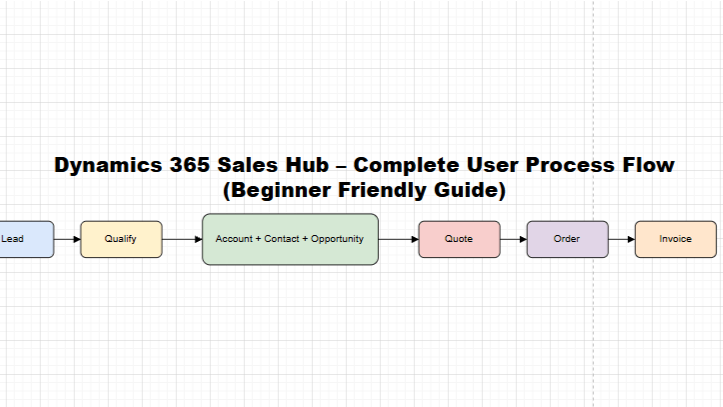
Dynamics 365 Sales Hub – End-to-End Process Flow
Lead
→ Qualify
→ Account & Contact
→ Opportunity
→ Quote
→ Order
→ Invoice
This is the core sales lifecycle followed in most organizations.
Step 1: Lead – Starting Point of Sales
A Lead is a potential customer who has shown interest.
When to create a Lead?
Website inquiry
Marketing campaign
Cold call
Referral
Why Lead is important: It helps capture unqualified customer data before investing sales effort.
Step 2: Qualify Lead
Once the customer shows genuine interest, the lead is Qualified.
What happens on Qualification?
Account is created (Company)
Contact is created (Person)
Opportunity is created (Deal)
👉 This step converts interest into a real sales opportunity.
Step 3: Account – Customer Company
An Account stores company-level information:
Address
GST / Tax details
Industry
Multiple contacts and deals
📌 One Account can have multiple Opportunities.
Step 4: Contact – Customer Person
A Contact represents the individual you communicate with, such as:
Owner
Purchase Manager
Finance Head
Correct contact data ensures smooth communication.
Step 5: Opportunity – Actual Deal
An Opportunity represents a potential sale with revenue value.
Opportunity Stages:
Develop
Propose
Negotiate
Won / Lost
Sales managers mainly track Opportunities to forecast revenue.
Step 6: Activities – Daily Sales Work
Activities help record daily sales efforts:
Calls
Emails
Meetings
Tasks
📌 Best Practice: Always link activities to Opportunities for accurate tracking.
Step 7: Quote – Price Proposal
A Quote is a formal price proposal sent to the customer.
Includes:
Products / services
Quantity
Pricing
Discounts & taxes
Quotes are usually created from Opportunities.
Step 8: Order – Customer Confirmation
Once the customer accepts the quote:
Quote is converted to Order
Confirms customer commitment
Orders trigger delivery or service execution.
Step 9: Invoice – Billing
An Invoice is created to request payment.
Includes:
Final amount
Payment terms
Due date
After invoice, payment collection begins.
Visual Sales Flow Diagram
Article content
🔁 Repost if this helps someone starting with Dynamics 365
 D365 Craft
Leave a Reply