
Introduction
In Dynamics 365 Business Central 25.0, Work Centers play a critical role in manufacturing and production planning. A Work Center represents a machine, production line, or group of resources where specific operations are performed. Correct Work Center configuration directly impacts capacity planning, costing, scheduling, analytics, and production efficiency.
This blog explains how to create a Work Center, how to navigate using menu search, and provides a complete field-by-field explanation with an analytics perspective. The screenshots used in this blog are the same as the ones you shared.
How to Open Work Center Page (Menu Search)
Figure 1: Work Center Menu Search in Dynamics 365 Business Central 25.0
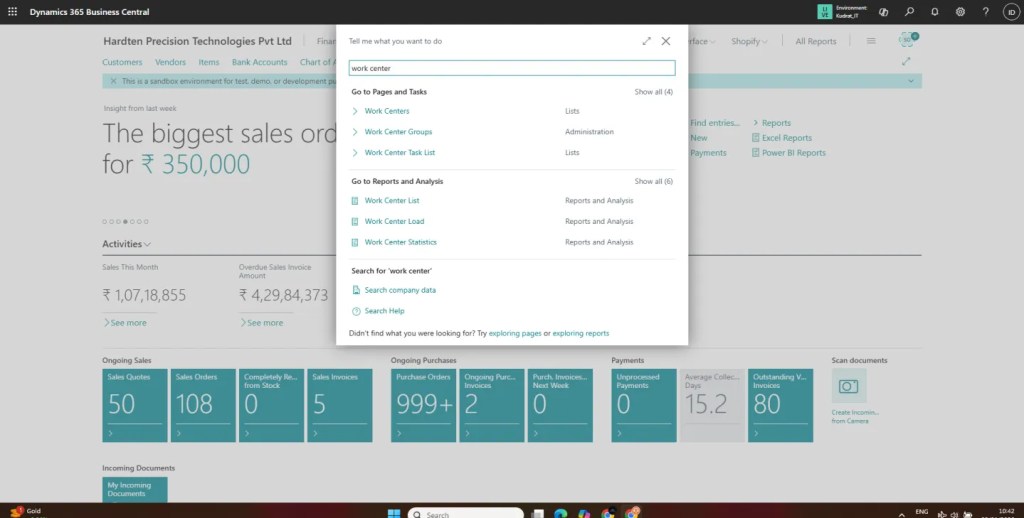
To navigate to Work Centers in Business Central 25.0:
- Type Work Center
- Select Work Centers from the list
This navigation is shown in Image 2 – Menu Search Screen.
Why this matters: Menu search is the fastest way to access configuration and master pages, especially for analytics and operations teams.
Creating a New Work Center
Figure 2: Work Center Card – WC-0001 (Diamond Planing)
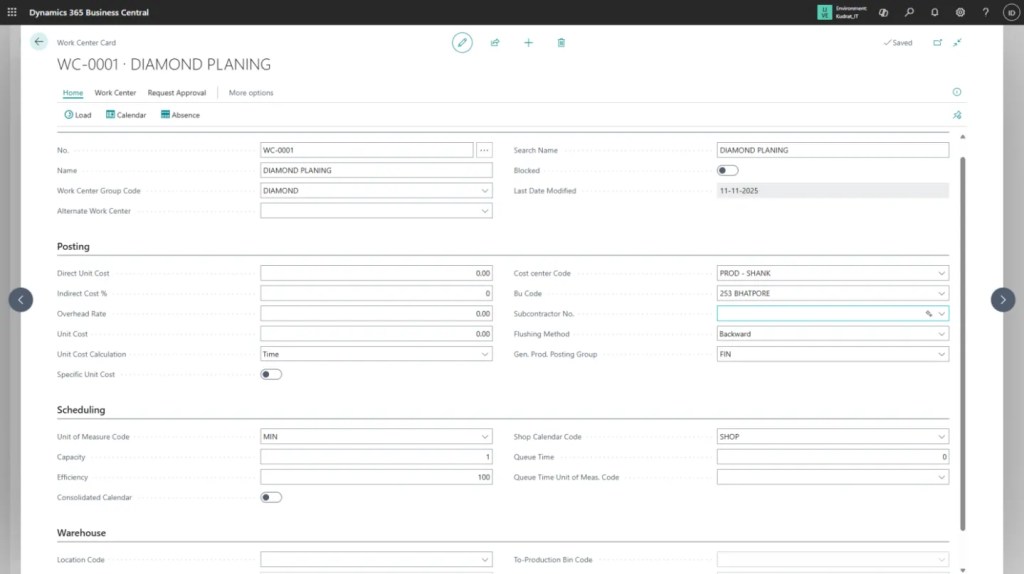
Once you open the Work Centers list:
- Click + New
- The Work Center Card opens
- Enter required details and save
Work Center Card – Complete Field Explanation
- No. – Unique Work Center code
- Name – Description of the Work Center
- Work Center Group – Logical grouping of similar resources
- Blocked – To temporarily stop usage
- Direct Unit Cost – Cost per hour or per unit
- Indirect Cost % – Overhead allocation
- Overhead Rate – Additional burden cost
- Unit Cost Calculation – Automatic cost calculation logic
- Capacity (Hours per Day)
- Efficiency %
- Queue Time – Waiting time before processing
- Run Time – Actual operation time
- Move Time – Time to move to the next operation
These values are used by the planning engine to generate realistic schedules.
- Working shifts
- Holidays
- Machine breakdowns
This prevents overloading the Work Center.
Analytics & Reporting Benefits
Well-configured Work Centers enable:
- ⏱ Queue Time & Bottleneck Analytics
These insights are essential for production managers, finance teams, and business analysts.
Best Practices
- Always assign Work Center Group Codes for aggregation
- Keep Efficiency % realistic to avoid misleading KPIs
- Align Cost Center & BU Code with finance structure
- Review Flushing Method carefully for inventory accuracy
- Periodically audit capacity and calendar settings
Conclusion
In Dynamics 365 Business Central 25.0, Work Centers are not just a master record—they are the foundation of manufacturing analytics and operational intelligence. A properly defined Work Center ensures accurate costing, realistic scheduling, and actionable insights across production and finance.
 D365 Craft
Leave a Reply